This repo contains the code to run ml-runner - a python base server that allows users to run ML models on images on a dedicated machine. Simple to set up, and easy to implement new models.
The motivation behind this work is that certain models are really complicated to convert to torch script and sometimes not even feasibale. To allow Nuke users (and other software users) to take advantage of this models without having to hop into comfy ui.
FYI - this is an ongoing project I'm working on - and by no means a finished software. It saves me a lot of time to use this - but there is no exepectations at all for people to be using it given that its still very undevelopped.
After having followed the install instructions to install the server simply run the following code from inside the created virtual environment
ml-runner --listen_dir /path/to/listen_dir
And the server will be listening on the given directory. Once the server is started, it'll keep going waiting until told otherwise. To stop it - simply press ctrl+c in the terminal (I know not great).
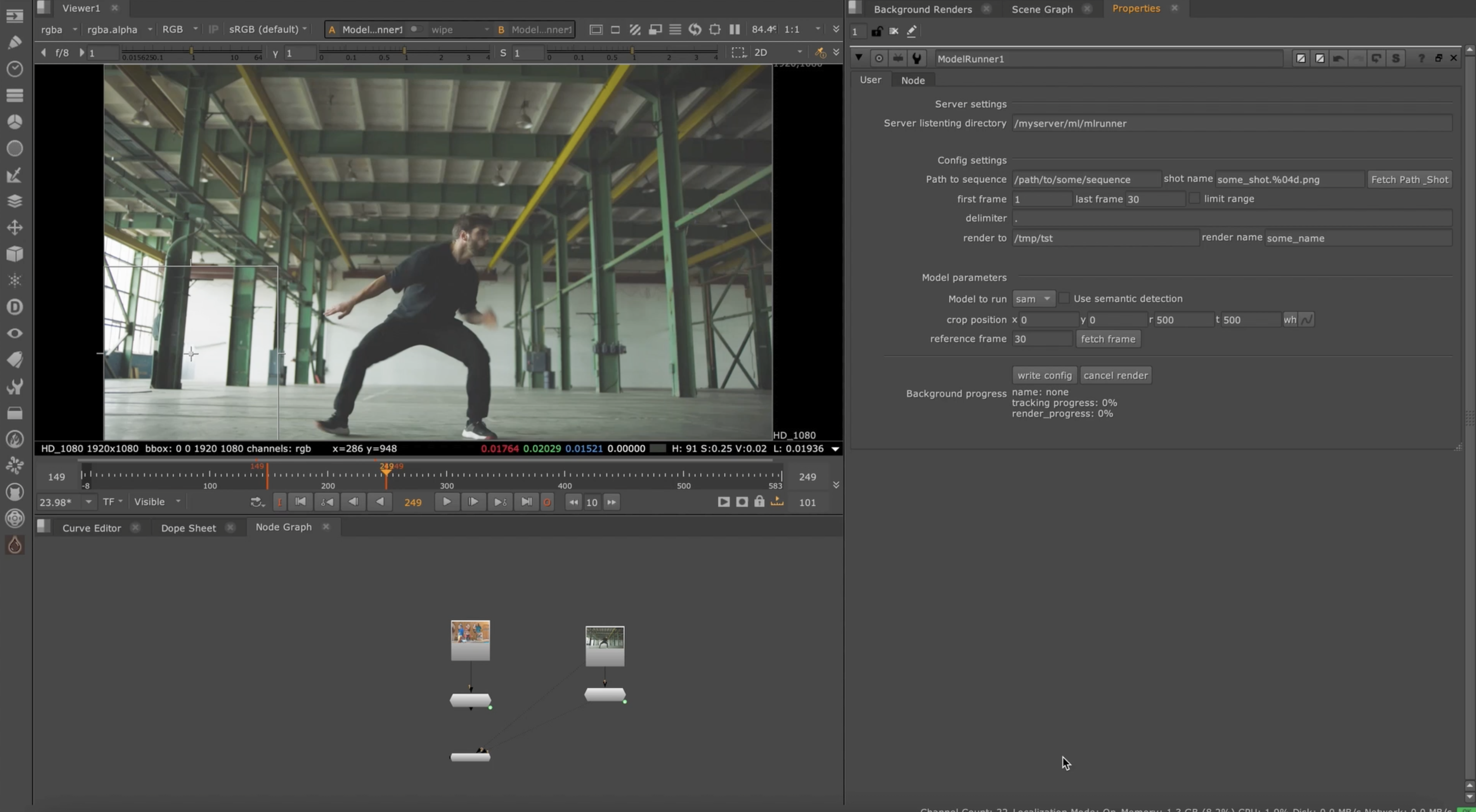
Once the server is running, you can send the configs to the listening directory from Nuke using the ModelRunner node. Obviously, the machine that is running the server MUST have access to the directories where the images you want to process/ render are - otherwise it will fail.
The config files right now are created from Nuke - however it can be implemented in any app, as long as they allow you to use python. Nuke gizmo is contained inside this repo under nuke_plugin/ToolSets/ML/ModelRunner.nk
To see how the nuke node works, simply click the below image or the link to video
The web serve is a simple python app that display a json file on html. To allow the webserver to be visible to other people on your network - you may need to open a port on the firewall. Before doing that make sure the network you are on is private and/or speak with IT/SystemAdmin to ensure the port you are opening is safe. Opening a port on a public network can expose your computer to vulnerabilities so be safe. In most VFX facilities this is fine as the network is already very safe so opening a port would be only visible by people on your network. But again - be safe and speak wiht IT/SysAdmin if you aren't sure what you are doing.
To disbale the web server simply run:
ml-runner --listen_dir /path/to/listen_dir --no-web_server
To limit the networks that can access the server run
ml-runner --listen_dir /path/to/listen_dir --ip_allow_list
If --ip_allow_list is enabled - you will need to set the subnets that are allowed inside the ml_runner.py file.
By default the server runs on port 8001 - you can override it by doing
ml-runner --listen_dir /path/to/listen_dir --port 8001
Main features:
- EXR,PNG and MOV loading
- Limit range (if you want to process only parts of a sequence)
- Cancel/interrupt renders
- Load images back into Nuke
- WebServer to dispaly queue for people on the network NEW FEATURE
Implemented models:
- SAM2
- SAM3
- DAM4SAM
- Florence2 <- Disabled by default as it takes 2 minutes to activate when starting the server, if you want to use it enabled it in the server code.
- GroundindDINO
- DepthCrafter
- DepthAnything3
- RGB2X
- CoTracker3
- ml-sharp
Known issues:
- Image loading into Nuke is a bit hacky - it places them quite randomly in the script.
- If using GDINO/Florence - it only loads one of the created masks to nuke, instead of all the created masks
- Supports only EXR and PNG.
- Haven't implemented error reporting to Nuke
- Progress reporting to node UI is buggy - to see refresh you need to close reopen the node properties
- ML-Sharp will run on any Nuke version - however it won't import the splats to Nuke unless you are running Nuke17!
The license of this repository only covers the ml-runner related code. All of the code/files in third-party-models come with the original model repository license. Please visit the original model repo to refer to the model licenses.
The server code has been tested with Linux Rocky 9 Python 3.10 PyTorch2.7 and CUDA12.8. However it should work with other CUDA versions and some other pytorch versions, depending on how far you go. The repo assumes that you have an NVIDIA GPU and that is good enough to run some models.
This project is packaged with uv which simplifies the install, however a manual install method is also provided using python and pip.
To install uv on Linux:
curl -LsSf https://astral.sh/uv/install.sh | sh
See uv install for installing on other operating systems.
Note
Installation with uv is considerably faster than installing with pip
For the manual install method it is required that python3.10, pip, and virtualenv are installed.
Before installing the server the project must be cloned locally:
git clone https://github.com/lprestini/ml-runner.git
cd ml-runner
To install the project:
uv sync
To run the ml-runner script you may enter the virtual environment created by uv, or prefix the commands with uv run:
# with venv
source .venv/bin/activate
ml-runner --help

# with uv run
uv run ml-runner --help
This project contains a nuke plugin which should be enabled in your init.py. To enable add the following line to your init.py file:
# ~/.nuke/init.py (Linux)
nuke.pluginAddPath('/path/to/ml-runner/nuke_plugin/')
Start by cloning the repository as described above, and creating a virtual environment:
python3 -m virtualenv mlrunner_venv
. mlrunner_venv/bin/activate
Once the virtualenv enviornment is created and activated, we install pytorch & torchvision. If you want to install a different version of torch, you can find them here: link
pip install torch==2.7.1 torchvision==0.22.1 torchaudio==2.7.1 --index-url https://download.pytorch.org/whl/cu128
Now that torch is installed, lets install the various python modules along with the package, and download the checkpoints for SAM
pip install -r requirements.txt
pip install --no-deps -e .
This section describes methods for downloading thirdparty models.
Most of the other models can be easily downloaded from huggingface without any external dependencies. It is recommended to install these packages uv which provides the uvx command to easily download via the huggingface cli.
Alternatively, additional install methods with git are provided. For these methods git-lfs is required to enable downloading checkpoints and other large files.
Model install commands should be run from the project root unless described otherwise.
The following commands will ensure that SAM2 and DAM4SAM are installed correctly:
cd third_party_models/edited_sam2/checkpoints/
./download_ckpts.sh
cd ../../../
Installing GroundingDINO (This is not required for the basic functionality. It's only used if you want to use semantic detection)
To install GroundindDINO, follow the instructions on their page here: https://github.com/IDEA-Research/GroundingDINO Or try follow these. If you follow the one on their repository MAKE SURE TO REMOVE TORCH & TORCHVISION from their pip requirements.
Check CUDA_HOME is set
echo $CUDA_HOME
If it's empty, then run the following
which nvccc
Take the output of that, and put it into CUDA_HOME
e.g my output is:
/usr/local/cuda-12.9/bin/nvcc
so my CUDA_HOME will be
export CUDA_HOME=/usr/local/cuda-12.9/
cd third_party_models
git clone https://github.com/IDEA-Research/GroundingDINO.git
cd GroundingDINO/
Now edit the requirements.txt file in GroundingDINO folder and remove the first two lines (torch and torchvision) Save and exit
pip install -e .
mkdir weights
cd weights
wget -q https://github.com/IDEA-Research/GroundingDINO/releases/download/v0.1.0-alpha/groundingdino_swint_ogc.pth
cd ..
If you have weird errors when doing pip install -e . try doing pip install .
This is a replacement repository for GDINO semantic detection.
uvx hf download --local-dir ./third_party_models/Florence-2-large microsoft/Florence-2-large
Alternative install with git:
cd third_party_models
git lfs install
git clone https://huggingface.co/microsoft/Florence-2-large
REMEMBER TO USE THIS YOU NEED TO ENABLE IT IN THE SERVER CODE
To install DepthCrafter please run the following commands:
uvx hf download --local-dir ./third_party_models/depth_crafter/checkpoints/DepthCrafter tencent/DepthCrafter
uvx hf download --local-dir ./third_party_models/depth_crafter/checkpoints/stable-video-diffusion-img2vid-xt stabilityai/stable-video-diffusion-img2vid-xt
Alternative install with git:
cd third_party_models/depth_crafter
mkdir checkpoints
cd checkpoints
git lfs install
git clone https://huggingface.co/tencent/DepthCrafter
git clone https://huggingface.co/stabilityai/stable-video-diffusion-img2vid-xt
To install RGB2X please run the following command:
uvx hf download --local-dir ./third_party_models/rgb2x/checkpoints/rgb-to-x zheng95z/rgb-to-x
Alternative install with git:
cd third_party_models/rgb2x/
mkdir checkpoints
cd checkpoints
git lfs install
git clone https://huggingface.co/zheng95z/rgb-to-x
To install Co-tracker3 please run the following commands:
git clone https://github.com/facebookresearch/co-tracker.git ./third_party_models/co-tracker
uvx hf download --local-dir ./third_party_models/co-tracker/cotracker3 facebook/cotracker3 scaled_online.pth
Alternative install with git:
cd third_party_models/
git clone https://github.com/facebookresearch/co-tracker.git
cd co-tracker
mkdir cotracker3
cd cotracker3
wget https://huggingface.co/facebook/cotracker3/resolve/main/scaled_online.pth
To install DepthAnything3 you simply need to download the weights and move them at the base of the depth-anything3 folder in third-party-models.
uvx hf download --local-dir ./third_party_models/depth_anything3/DA3-GIANT depth-anything/DA3-GIANT
Alternative install with git:
cd third_party_models/depth_anything3/
git lfs install
git clone https://huggingface.co/depth-anything/DA3-GIANT
Important note, if you want to use other checkpoints other than the DA3-GIANT - you'll need to download the weights and edit the path in ml_runner/ml_runner/model_config.json to reflect what model you want to use.
To install SAM3 you need to download the checkpoint from hugging face. However to do so, you'll need to submit a form to get approval for downloading the checkpoints. Go to huggingface website and fill out the form. Once approved run the following replacing with your access token where applicable
uvx hf download --local-dir ./third_party_models/edited_sam3/checkpoints/sam3 --token <token generated at https://huggingface.co/settings/tokens> facebook/sam3
Note
The following Access Token Permissions must be enabled: Read access to contents of all public gated repos you can access
Alternative install with git:
cd third_party_models/edited_sam3
mkdir checkpoints && cd checkpoints
git lfs install
git clone https://huggingface.co/facebook/sam3
So far I have only implemented the semantic segmentation functionality as the box mode doesnt support the text and seems to be performing like sam2. Happy to go back to it eventually.
To instal ml-sharp run the following commands:
cd third_party_models/mlsharp
git clone https://github.com/apple/ml-sharp.git
cd checkpoints/
wget https://ml-site.cdn-apple.com/models/sharp/sharp_2572gikvuh.pt
That's it! Remember! If you want to use GSPLATS in Nuke make sure you are running Nuke17!
The following developer tools are set up for contributing:
Required
- prek: precommit hooks
- ruff: linting / formatting
Recommended
- uv: packaging
- GNU Make: helper scripts
To install GNU Make (Rocky 9):
dnf install make
To install uv, see Installing the Server.
To run the dev setup inc. installing prek precommit hooks:
make dev
For set up without GNU Make, please see the Makefile.